Guide
LinkedIn Ad Library: How to Use It (and What It Can't Show You)
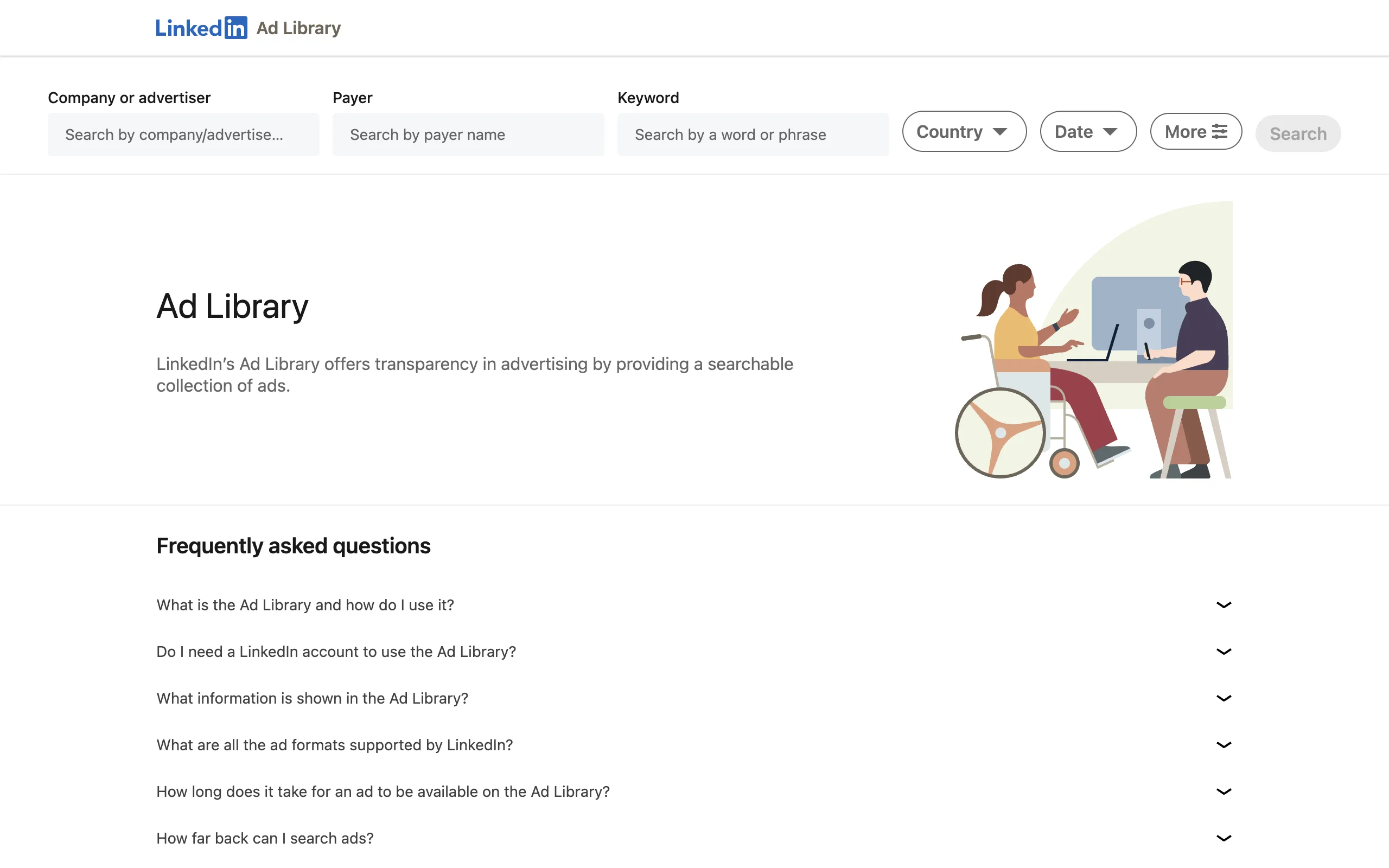
LinkedIn's Ad Library shows you every ad a company is running right now, free and without a login. That "right now" is the whole story: the moment a campaign stops, its ads are gone from the library, and with them any way to tell what a competitor actually ran or how long they kept paying for it. This guide covers how to use the tool properly, exactly where it stops, and what the same ads look like when somebody keeps the history.
What is the LinkedIn Ad Library?
The LinkedIn Ad Library is LinkedIn's public ad transparency tool. It lists the ads each advertiser is currently running on the platform, along with who paid for them and, where LinkedIn discloses it, the targeting parameters and rough impression ranges behind them. It is free, it needs no account, and it covers every advertiser on LinkedIn, not a curated selection.
It exists because ad transparency regulation requires it, and that origin explains its shape better than any feature list does. It was built to answer a regulator's question, "who is paying to say this, right now," not a marketer's question, "what works in my category." Everything it does well and everything it refuses to do follows from that one distinction.
How to use the LinkedIn Ad Library
There are five steps, and they take about a minute per company.
- 1
Open linkedin.com/ad-library
It's public. No LinkedIn account, no login, no ad account required.
- 2
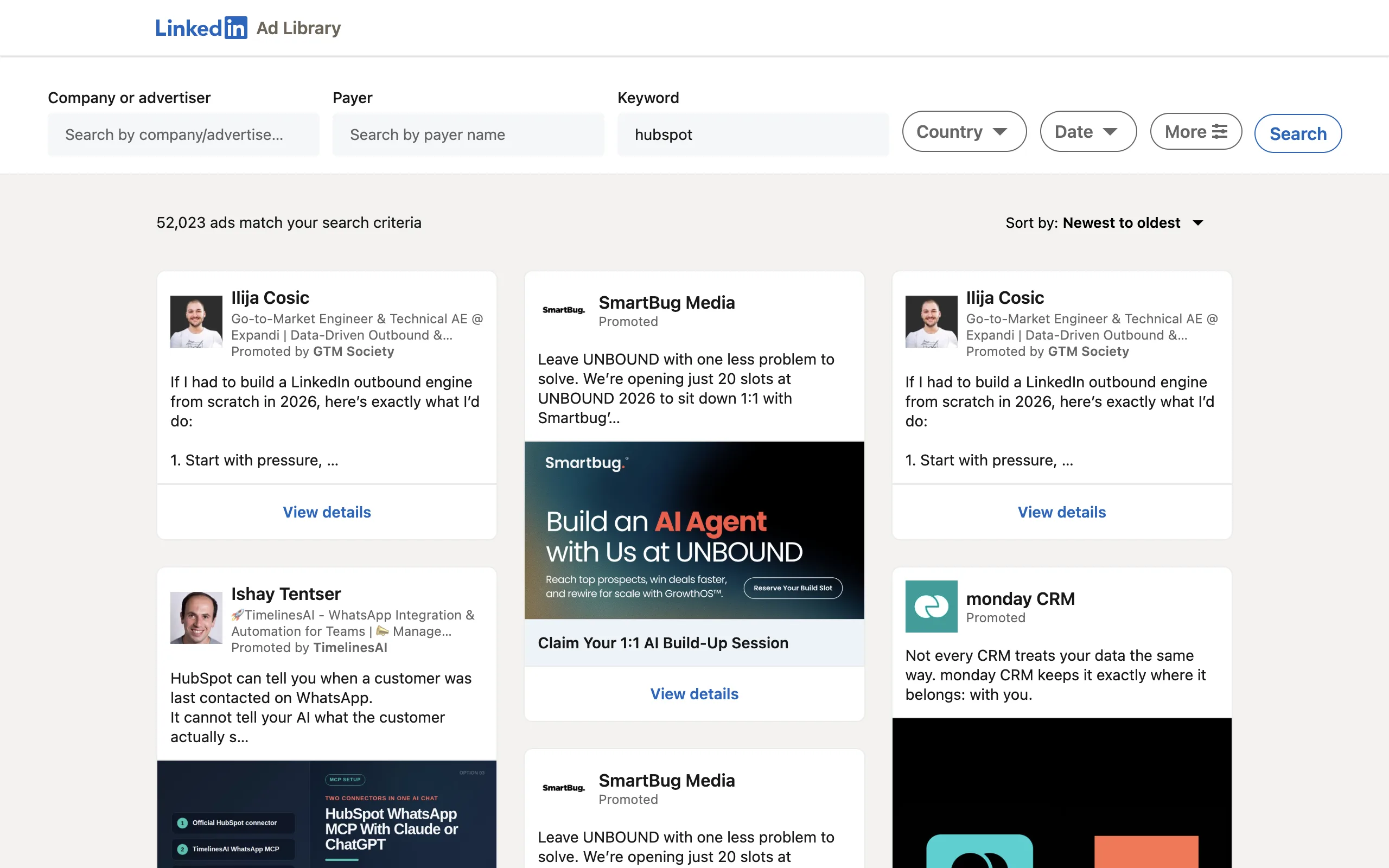
Search by company, payer or keyword
Three fields, and they all assume you already know what you're looking for. There is no browse, no industry list, no starting point if you don't have a name in mind.
- 3
Narrow it by date, country or language
These are the filters. Not format, not industry, not company size, not how long the ad has run.
- 4
Open an ad for the detail view
You get the creative, the advertiser, the payer, and the window the ad appeared in your search. On some ads you also get rough impression ranges and the targeting parameters used.
- 5
Then do it again for the next company
Comparing five competitors means five searches and five sets of screenshots, because nothing here holds state between them.
What it does well
For the job it was built for, it is the best source there is, and no third-party tool can beat it on its own ground. The ads come straight out of LinkedIn's ad serving system, so there is no question of authenticity, no sampling and no lag. An ad is listed because it is serving impressions today.
That immediacy is genuinely valuable, and it is worth saying plainly: no dataset assembled by anyone else, AdPeekly included, can tell you about a campaign that launched an hour ago. If your question is "what is this one company running this week," stop reading and go use the official tool.
Where the LinkedIn Ad Library stops
Ask it a research question instead of a compliance question and it runs out of road quickly. The limits below are not bugs or missing features on a roadmap; they are what a transparency register looks like when you try to use it as a competitive research database.
| What you want | LinkedIn Ad Library | AdPeekly |
|---|---|---|
| Ads from campaigns that already ended | –Deleted | 253,610 published ads kept |
| How long an ad has been running | –Not shown | First and last seen, per ad |
| Searching a whole industry at once | –One advertiser at a time | Filter across all 649 |
| Telling variants apart from real ideas | –Every variant counted | 95,893 distinct creatives |
| Getting the data out | –No export, no API | MCP server, free tier |
It has no memory
When a campaign ends, its ads leave the library. Not archived, not flagged as inactive: gone, with no way to look them up again. And while an ad is live, the library never tells you when it started, so you cannot distinguish a creative launched yesterday from one that has been running since January.
Those two facts together remove the single most useful signal in competitive research. Duration is the closest thing to a public performance metric that exists in advertising: nobody keeps paying, month after month, to serve a creative that does nothing. A tool that deletes ended campaigns and hides start dates is a tool that can show you what is running, but never what worked.
It only answers one company at a time
There is no industry filter, no format filter and no way to ask a question broader than a single advertiser. "Show me what cybersecurity companies are doing" is not a query the library accepts, so scoping a category means listing the companies yourself and searching them one by one.
What you get back is noisier than it looks, too. Advertisers run one creative in many near-identical variants, different headline, cropped image, swapped call to action, and the library lists each variant as its own ad. A single campaign can read as a dozen, so counting ads in the library tells you how much an advertiser is testing, not how many ideas they actually have.
Nothing comes out of it
There is no export, no CSV, no API. Every ad you want to keep for a swipe file or a competitive deck gets screenshotted by hand, and anything programmatic, a dashboard, an alert, a question asked inside an AI assistant, is simply off the table. The data is public to look at and private to use.
What the same ads look like when somebody keeps the history
That history exists, and keeping it is what AdPeekly does. AdPeekly is a research library of B2B LinkedIn advertising: it revisits the same public Ad Library on a repeating schedule, records every ad it finds across a curated list of 649 companies, and keeps each one after LinkedIn drops it, stamped with the first and last date it was seen running. 253,610 published ads later, the questions the section above could not answer have answers. Here are three of them, and what each one is good for.
Most LinkedIn ads are short. A third of them are gone inside a week, and the median ad runs 19 days. The interesting part is the tail: roughly one ad in fifteen is still running after three months, and those are the creatives worth studying, because they are the ones their owners kept paying for. Finding them is a sort, not a search: order the library by observed duration and the survivors come to the top, which is the single most useful thing you can do with a dataset that remembers.
35.0%
Under 7 days
88,664 ads
26.3%
7 to 29 days
66,659 ads
32.0%
30 to 89 days
81,039 ads
6.8%
90 days or more
17,248 ads
Industry moves the number far less than you would expect, and one vertical is a real outlier. Ten of these twelve industries sit between 14 and 21 days, clustered within a few days of the 19-day dataset median. Then marketing and growth companies keep their median ad live for 31 days, roughly 60% longer than everyone else, and operations and supply chain cycle theirs out fastest at 14. The people selling marketing tools run the longest campaigns in B2B, which is either confidence or a longer consideration cycle, and this dataset cannot tell you which.
The practical reading is the opposite of what a spread this narrow suggests at first glance. If your campaigns run three weeks, you are doing what almost every B2B advertiser does, whatever your vertical. The industry filter is still worth having, but for finding the outlier and for seeing which companies and formats sit behind a number, not because each vertical follows a different rule.
| Industry | Published ads | Median duration |
|---|---|---|
| AI & Automation | 31,833 | 17 days |
| Cybersecurity | 29,980 | 21 days |
| HR & Recruiting | 25,819 | 16 days |
| Developer Tools & Infrastructure | 24,481 | 20 days |
| Finance & Fintech | 22,906 | 19 days |
| Sales & Revenue | 20,130 | 19 days |
| Data & Analytics | 14,416 | 17 days |
| Operations & Supply Chain | 11,255 | 14 days |
| Marketing & Growth | 11,146 | 31 days |
| Legal & Compliance | 10,522 | 19 days |
| Productivity & Collaboration | 8,620 | 20 days |
| Consulting & Professional Services | 7,070 | 21 days |
Two thirds of what looks like volume is repetition. Grouping visually matching creatives and keeping one representative of each, those 253,610 ads collapse to 95,893 distinct creatives. Search results and every count on this site use the deduplicated figure, because a gallery of 200 ads that turns out to be 40 ideas in five variants each is the failure mode readers rightly punish. The rule is written out at /methodology. For anyone building a swipe file, that rule is the whole point: fifty saved ads should be fifty ideas, not ten ideas saved five times.
One caveat worth stating before you compare these numbers to your own count on LinkedIn: this dataset is a curated list of 649 B2B companies, and only ads that passed review are published. It is deliberately not a live unfiltered mirror of everything LinkedIn holds, so the count for any single company will be smaller than the raw total you could tally by hand. Every published ad has been checked, not just collected.
If what you actually want is to see the ads rather than read about the tool that lists them, the LinkedIn ads examples page is the shorter route: forty real creatives across every format, and the measured format mix behind them.
And if the question behind all this is specifically about a competitor rather than the tool itself, the guide to finding competitor ads on LinkedIn walks through the exact search steps, what the Sponsored badge does and doesn't confirm, and how to catch ads that never make it into this library at all.
So what is AdPeekly, exactly?
It is the tool those three findings came out of, built for the people who were doing this research by hand: B2B marketers, founders and agencies who need to know what a category is actually advertising before they write their own brief. Where LinkedIn's Ad Library gives you one advertiser at a time with no past tense, AdPeekly gives you 95,893 distinct creatives from 649 curated B2B companies, every one of them carrying the dates it ran, the format, the industry, the funding stage and the company size.
In practice that means the three moves above are one interface away. Filter to your category and read its real benchmark. Sort by duration and pull out the ads that survived a quarter. Save the deduplicated winners into a board and export the swipe file you would otherwise have screenshotted by hand. And because the same dataset is exposed to AI assistants through AdPeekly's MCP server, you can also just ask the question in Claude or ChatGPT and get the ads back in the conversation.
Every number above came from somewhere. That somewhere is open to you.
Pick the way you prefer to work. Open the web app and go through the library visually, filter by filter, or connect the MCP server and let the assistant you already have open do the searching for you. Same 253,610 ads behind both, and the free tier covers 3 searches a day with no card.
No card for the free tier. Full tool reference at /mcp.
 1Password
 Attio
Attio
 Asana
Asana
 Celonis
 Affinity
 BioRender
 Ashby
Ashby
 Demandbase
 CodeAnt
 Dost
Dost
Frequently asked questions
Yes, LinkedIn's Ad Library lets you search by company name, payer name, or a free-text keyword, and results can be narrowed by date, country or language. What it cannot do is search across an industry or compare several advertisers at once: there is no industry filter, no vertical filter, and no way to query multiple companies in a single search. Comparing five competitors means running five separate searches, each producing its own set of results, and assembling the comparison by hand afterward, typically with screenshots since nothing exports. AdPeekly indexes the same public LinkedIn ad data but adds the structure LinkedIn's own tool skips: 253,610 published ads from 649 curated B2B companies, one search across the whole set instead of one advertiser at a time, filterable by industry, format, company size and how long each campaign has run. That cross-company search is the single biggest practical difference between the two tools.
No. LinkedIn does not publish an API for its Ad Library, so nothing can query it programmatically: every result has to come from the web interface, one manual search at a time, with no bulk export and no way to schedule refreshes. That gap is exactly why comparing a handful of competitors already takes real manual effort, and why monitoring a whole industry over time is not practical by hand. AdPeekly runs an unofficial, read-only MCP server over its own dataset instead, so an MCP client like Claude, ChatGPT or Cursor can query 253,610 published LinkedIn ads and 95,893 distinct creatives directly, in a chat, without opening a browser or copying screenshots. The free tier allows 3 searches a day with up to 5 results each, no LinkedIn account or card required, and paid access raises both limits for ongoing research. See /mcp for the full tool list, what each one returns, and how to connect a client in a couple of minutes.
Technically yes, it is a public page with no login wall, so nothing legally stops a script from requesting it. In practice building and maintaining that scraper is the hard part: LinkedIn's markup changes, pagination and rate limits have to be handled, and a one-off scrape only captures ads running at that exact moment, with no way to see anything that has already ended. AdPeekly already built that pipeline and runs it on a repeating schedule across 649 curated B2B companies, recording each ad's first-seen and last-seen date so campaign duration becomes measurable instead of guessed, then deduplicating near-identical variants down to 95,893 distinct creatives. That structured, continuously updated dataset is what the 3-searches-a-day free MCP tier queries, and what this page's gap comparison and duration tables are drawn from. Building a one-off scraper gets a single snapshot; querying an already-running pipeline gets a maintained archive. See /mcp for how to connect to it.
No. LinkedIn's Ad Library only shows ads that are currently running, so once a campaign ends its ads disappear from the tool with no historical record, no way to look up what a competitor ran last quarter, and no way to confirm how long a since-ended campaign actually lasted. That is a structural limit of the tool, not a bug: it was built for present-moment transparency, not as an archive. AdPeekly's dataset is the closest thing to one: 253,610 published ads, each carrying a first-seen and last-seen date, so observed campaign duration is a real, computed number rather than a guess. Across the whole corpus the median campaign runs 19 days measured from a reported start date, with 35% of ads observed running under 7 days and 6.8% running 90 days or more, figures no longer visible once LinkedIn's own tool drops an ad. See the gaps below for what that data actually shows, industry by industry.
Yes. LinkedIn's Ad Library is free and public, with no LinkedIn account, login or payment required to search it or view any ad's detail page. AdPeekly's browsing is also free at the MCP tier: 3 searches a day, up to 5 ads returned each time, no card required to connect a client and start querying. It is the same underlying kind of public LinkedIn ad data both tools work from, but indexed differently: LinkedIn's version searches one advertiser at a time with no cross-company filter, while AdPeekly's free tier already searches across all 649 curated B2B companies at once, by industry, format, company size and observed campaign length. Paid access removes the daily search cap and unlocks full result pages plus the web app, for ongoing competitive research rather than the occasional lookup. Either way, nobody pays LinkedIn to browse its own Ad Library, and nobody has to pay AdPeekly to try the same kind of cross-company search either.
See what LinkedIn's Ad Library can't show you
253,610 published ads, 95,893 distinct creatives, searchable by industry, format and how long each one actually ran.
See pricingData verified September 22, 2026. How it is collected: methodology.