LinkedIn Ads Library MCP server (unofficial)
See what other B2B companies are advertising on LinkedIn, and ask questions about it in the AI chat you already use. Connect AdPeekly to Claude, ChatGPT, Cursor or any MCP client and your assistant can search 253,610 published ads from 636 companies, read the real creatives, and tell you how long each campaign has actually been running.
Not a LinkedIn product
AdPeekly is an independent product. It is not affiliated with, endorsed by or sponsored by LinkedIn or Microsoft. It reads LinkedIn's public Ad Library, the same one anyone can browse, and adds search, history and structure on top of it.
- No LinkedIn login or OAuth
- No ad account needed
- Read-only: it cannot post, edit or spend
- Your API key is the only credential
AI integration
Ask your AI.
It researches 253,610 ads
for you.
Connect AdPeekly to Claude, ChatGPT or any MCP client. Your AI queries the same enriched library you browse here: copy, advertisers, targeting, creatives and how long every ad has been running.
- Filter by industry, country, funding stage, headcount and ad duration
- Your AI sees the real creatives, not just the text
- It can read your own Saved Ads boards
Setup
Install it in about two minutes
Get a free key, pick your client, paste one line. Replace YOUR_KEY with the key shown on your MCP page after signup.
Works on every Claude plan, including Free.
- 1Open Claude, go to Settings → Connectors and click Add custom connector.
- 2Paste the connector URL below, key included.
- 3Under Authentication, select No sign-in. Claude may flag "Sign in now" as detected. Pick No sign-in anyway, since this key already authenticates the URL.
Connector URL, key included
https://spkftjsjduykrvzeuzld.supabase.co/functions/v1/mcp-server/YOUR_KEYAnyone with that URL can use your quota, so treat it like a password. It also ends up in your shell history and in server logs, so prefer a bearer token header whenever your client supports one.
What it looks like
One question, start to finish
You
Which cybersecurity companies have kept the same LinkedIn ad running longest, and what do those ads say?
Your assistant, calling AdPeekly
search_ads(industries: ["Cybersecurity"], minDurationDays: 180, platforms: ["linkedin"])Answer
A ranked list of advertisers with the ads still live after six months, the copy each one runs, and the first date it was seen. Ask to see them and the assistant calls get_ad_images, which puts the actual creatives in the conversation for it to read, not links.
Pick a question
Replay of a real session recorded in September 2026. Connect your own assistant and the answers come from live data.
An ad that has run for six months is the closest thing to a public signal that it works. Nobody keeps paying to serve a creative that does nothing, and the first and last seen dates are the only place that shows up.
Prompt library
Steal these prompts
Written against what the connector actually exposes, so they return real data on the first try.
Market research
Which B2B fintech companies in Germany have ads running 90+ days? Group them by funding stage.
You get: A ranked table of advertisers with duration and funding context.
Market research
What are cybersecurity companies with 201-500 employees testing right now? Only ads in the New or Testing stage.
You get: Early signals, before a campaign becomes obvious to everyone.
Market research
Show me the longest-running ads from companies in the $10M-$50M revenue range and tell me what they have in common.
You get: The patterns that survive contact with a real budget.
Market research
Check which filter values are available, then tell me which industries have the most ads still running after six months.
You get: Your AI reads the filter vocabulary itself, then answers with real counts.
Competitor teardown
Pull everything ramp.com is running and show me the 5 longest-running creatives with their copy.
You get: The advertiser profile, ad counts, and the proven evergreens.
Competitor teardown
Compare how Notion and Airtable talk about the same problem in their ads. Where do the messages diverge?
You get: A positioning diff you can take into a strategy call.
Speak the library's language
Name these values in your prompt and the answer gets sharper. Your AI can also look the full list up on its own, so you do not have to memorise anything.
Ad stage
Headcount
Revenue
CTA
Also filterable
Creatives
Your AI actually sees the ads
Ask to see or compare creatives and AdPeekly sends the real images into the conversation, up to 5 per request. Your AI reads layout, colour, text overlays and proof elements, not just the copy.
Try it
Show me the creatives of the 5 longest-running fintech ads and rank them by how clearly they state the offer.
Try it
Turn the winning creative into an image brief for my brand, using #1A2B3C and #FF6B35, keeping the layout and the hook.
Two shortcuts your client already has
Besides the tools, the connector ships two ready-made prompt templates. In Claude they show up as slash commands, in other clients under "add from connector". Both want an ad your AI has already found.
ad_copy_variantsCopy variants of a specific ad, keeping its hook and angle.ad_image_briefA creative brief for a new image ad, ready for a designer or an image model.
Turn any ad into your own creative
Download an ad you like, hand it to an image model, and ask for the same idea rebuilt for your brand. You get finished creatives, not a brief you still have to design.
- 1In Library or Saved Ads, hit Download on an ad, or select several and export the whole board.
- 2Drag the files into ChatGPT, Claude or Gemini and paste the prompt below, with your own domain in place of yourbrand.com.
The prompt
Use this ad image attached from AdPeekly. Identify the strongest creative concepts, visual formats, humour, hooks and messaging patterns. Then recreate those concepts specifically for yourbrand.com, using its brand colours and visual identity, positioning and value proposition, target audience and tone of voice. Adapt them so they feel native to yourbrand.com while preserving the underlying creative idea that makes the original effective. Do not simply copy the original ad. Output requirements: generate the actual ad creatives as images, not a document, an analysis or a text-only concept. Square 1:1, optimised for LinkedIn. For each concept, generate the finished visual and include the final on-image copy directly in the image.
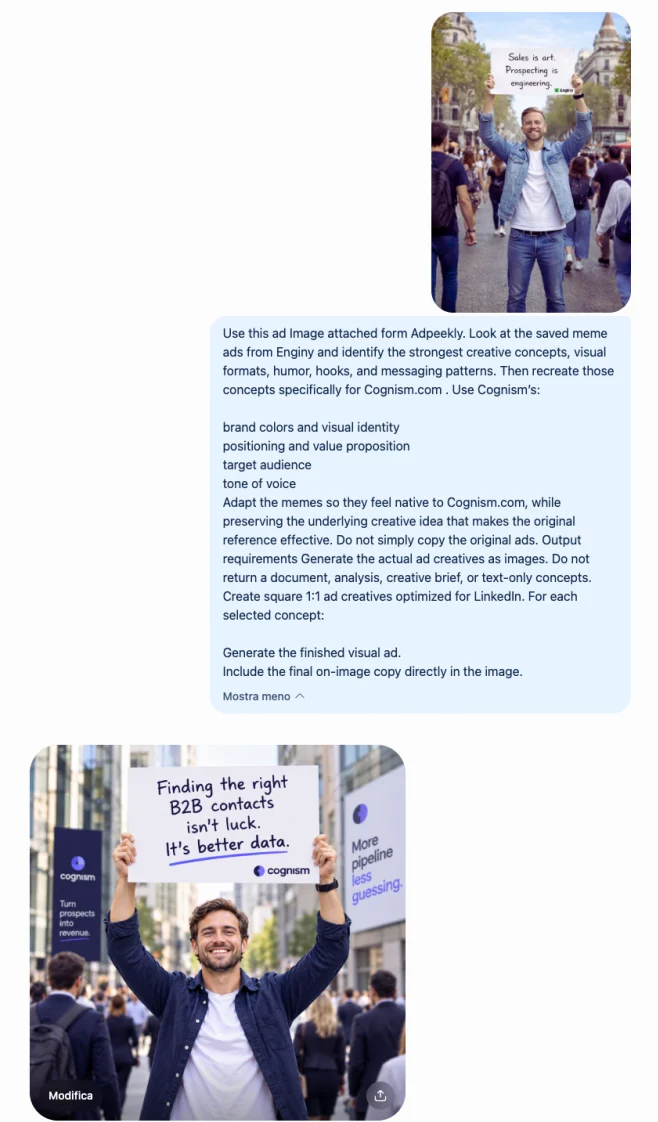
One thing about how they look in chat. Chat apps collapse connector images into a small thumbnail instead of laying them out. That is the client's choice and outside our control. Your AI still reads them correctly, so analysis works either way, and downloading is only needed when you want to look at them yourself.
Plans
What the free key actually gets you
Free
- 3 searches a day
- 5 results per search
- The real creatives, 3 per request
- The web Library
- Saved Ads boards
Pro
34.90 EUR /month
- 10,000 searches a month
- Full result pages, up to 25 per search
- 5 creatives per request
- The web Library, all filters
- Saved Ads boards, readable by your AI
Reference
What your AI can call
The full tool surface. Your client discovers these automatically on connection; they are written out here so you know what the server can answer before you install it.
| Tool | Takes | Returns | Limits |
|---|---|---|---|
| search_ads | query, industry, country, funding stage, headcount, format, duration, hook type, offer, copy structure, visual format, thought leadership, page | Matching ads with copy, advertiser, dates and how long each has run | 25 results per page on a paid plan, 5 on free |
| get_ad | id | One ad in full: copy, targeting, landing page, UTM, media | None |
| get_ad_images | ids, variant | The creative images themselves, into the conversation | 5 ads per call on a paid plan, 3 on free |
| get_brand | name | An advertiser profile, ad counts and their longest-running ads | None |
| get_filter_options | none | Valid filter values with counts, so a query cannot guess wrong | Free of the daily search quota |
| list_boards / get_board_ads | board_id | Your own Saved Ads boards | Paid plans only, since free has no Library |
Questions
Before you connect it
Yes. AdPeekly runs an unofficial LinkedIn Ads Library MCP server that any MCP client can connect to, including Claude, ChatGPT, Cursor and VS Code. It exposes 253,610 published B2B LinkedIn ads from 636 companies, with the advertiser, the creative, the targeting on record and the first and last dates each ad was observed running. It is read-only research data, not a campaign manager: it cannot create, edit or spend anything. A free key covers 3 searches a day.
No. AdPeekly is an independent product and is not affiliated with, endorsed by or sponsored by LinkedIn or Microsoft. LinkedIn is their trademark, used here only to say which platform the data describes. The server reads LinkedIn's public Ad Library, which anyone can browse, and adds structure, history and search on top of it.
No. There is no LinkedIn login, no OAuth and no ad account involved at any point. You authenticate to AdPeekly with an AdPeekly API key and nothing else. This is the main difference from most LinkedIn MCP servers, which manage campaigns and therefore need write access to an ad account you own.
Those connect to your own ad account so an assistant can create, edit and report on campaigns you are running. They need write access and they only see your data. This one is the opposite: read-only, no account access, and it sees what other companies are advertising. One helps you operate your campaigns; this one helps you research everyone else's before you write yours.
Anything that speaks MCP over streamable HTTP. Claude, Claude Code, ChatGPT, Cursor and VS Code are the ones with step-by-step instructions above. For clients that can send an Authorization header, the key travels in the header, which is the form to prefer. For clients that only accept a bare URL, there is a variant with the key in the path, at the cost of the key appearing in platform logs.
A free account gets 3 searches a day, each returning up to 5 ads, and the counter resets at midnight UTC. Connecting a client and letting it list the available tools costs nothing, so opening a new chat is free. Paid plans lift that to 10,000 searches a month with full result pages, and add the web Library and Saved Ads boards.
Not today. The published library is LinkedIn only, so a question about Google or Meta campaigns returns nothing rather than a guess. Meta ads exist in the pipeline but none are published, and saying otherwise would be the first thing anyone connecting the server would catch.
It comes from LinkedIn's public Ad Library, collected on a repeating schedule so that each ad carries the dates it was actually seen running rather than an estimate. That observation window is what makes campaign duration measurable at all. The collection cadence, the deduplication rule that turns 253,610 rows into 95,893 distinct creatives, every enrichment field and the known coverage limits are written out in full on the methodology page.
New to MCP itself? It is an open standard for connecting assistants to data sources, documented at modelcontextprotocol.io.
Connect it in about two minutes
A free key, no card, 3 searches a day. Enough to find out whether your assistant answers better with 253,610 real ads behind it.
Get a free keyData verified September 21, 2026. How it is collected: methodology.